Release Timing for Playlist Consideration: Guide
Release Timing for Playlist Consideration: Guide
Miss the 7-day Spotify pitch cutoff, and you lose editorial eligibility for that release. That’s the short version.
If I had to sum up the whole process in a few lines, it would be this:
- I’d set a Friday release date
- I’d upload at least 4–6 weeks early
- I’d check Spotify for Artists as soon as delivery lands
- I’d submit the focus track before the 7-day cutoff
- I’d start pre-saves 2–3 weeks before release
- I’d watch Day 1, Day 7, and Day 14 data for saves, skips, and retention
A few numbers matter most here: 7 days is the hard Spotify minimum, 24–72 hours can disappear while a release shows up in Spotify for Artists, and 3–8% save rate is a solid early sign. The main point is simple: good songs still need enough lead time.
Here’s the whole article in plain English:
- Release timing affects playlist access. If I upload too late, I may not get into the editorial pitch window at all.
- The minimum is not the safe plan. A 4–6 week runway gives me time for distributor review, metadata fixes, and pre-save setup.
- Friday works best because it lines up with major DSP release cycles and weekly tracking.
- Pre-saves need working links. If I launch them before the platform links are ready, they may fail on release day.
- The first two weeks tell the story. I need to check conversion, save rate, curator adds, skip rate, and week-two drop.
If you want the simplest rule set: finish assets early, upload early, pitch early, and don’t send traffic until the song is live everywhere.
NEW | How to Schedule Music Releases on Spotify in 2025 | Step-by-Step Release Strategy
sbb-itb-e819543
Build Your Release Calendar Before You Set a Date
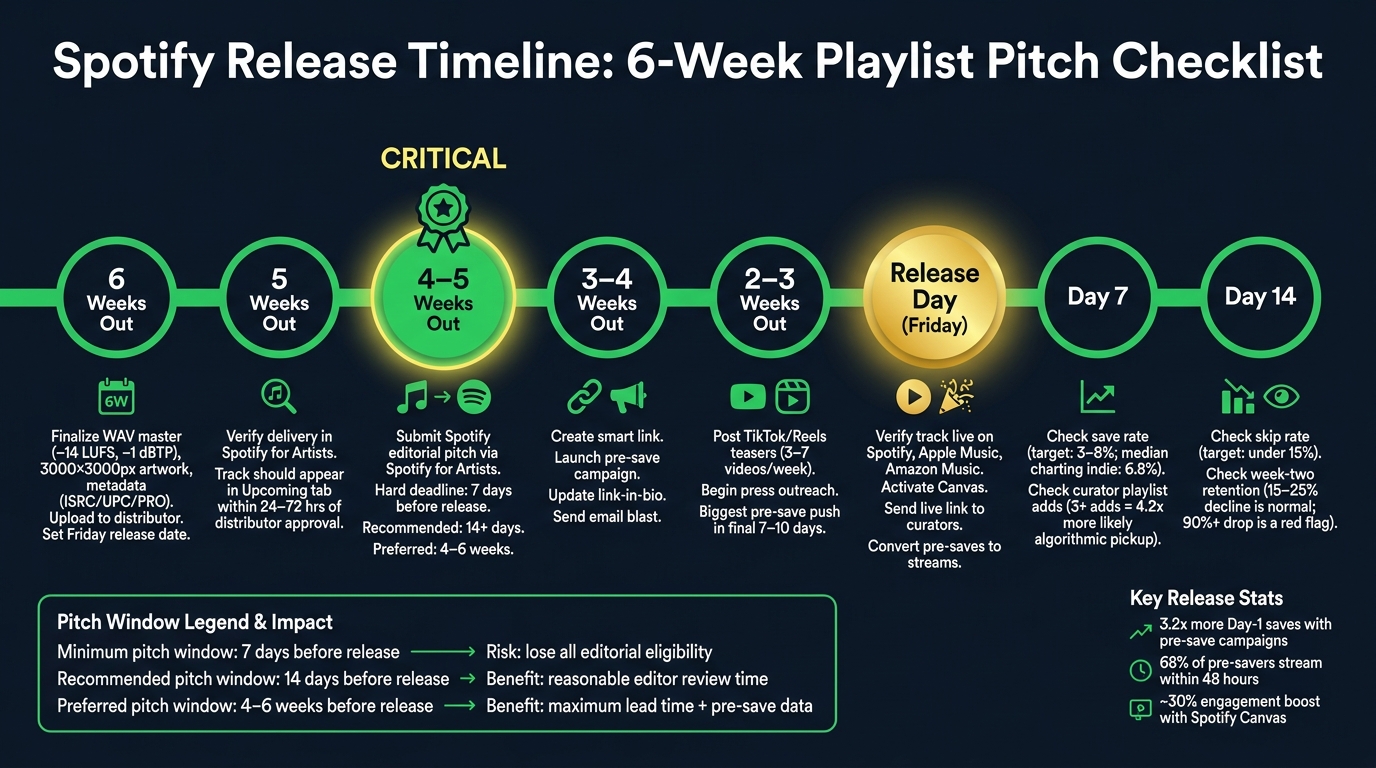
Spotify Release Timeline: 6-Week Playlist Pitch Checklist
Work backward from a Friday release date. That lines up with New Music Friday, Release Radar, and Billboard tracking. From there, set firm deadlines for each task. The timeline below turns that release window into weekly checkpoints you can actually follow.
A Week-by-Week Planning Timeline: 4 to 6 Weeks Out
Start six weeks out. By that point, your master, artwork, metadata, and rights registrations should already be done. This only works when the assets are finished early and delivered without issues.
Use this as your working checklist.
| Timing | Required Action | Owner | Completion Check |
|---|---|---|---|
| 6 Weeks Out | Finalize WAV master (–14 LUFS, –1 dBTP true peak), 3000×3000px RGB art (no logos, handles, or URLs), and metadata (ISRC, UPC, composer credits, PRO affiliation); upload to distributor | Artist/Producer | Files accepted by distributor; ISRC/UPC assigned |
| 6 Weeks Out | Register with your PRO and The Mechanical Licensing Collective (The MLC) and set Friday release date | Artist | Friday date set |
| 5 Weeks Out | Verify delivery in Spotify for Artists (S4A) | Artist | Track visible in "Upcoming" tab |
| 4–5 Weeks Out | Submit Spotify editorial pitch via S4A | Artist | Pitch confirmation visible in S4A |
| 3–4 Weeks Out | Create a smart link and launch pre-save campaign | Artist/Marketing | Link-in-bio updated; email blast sent |
| 2–3 Weeks Out | Start TikTok/Reels teasers and press outreach | Artist | 3–7 videos posted per week |
| Release Day | Update links to "Live" and send traffic | Artist | Pre-save converts to stream link; S4A Canvas active |
| Weeks 1–2 Post-Release | Monitor save/skip rates and share placements | Artist | Tag curators; reply to all DMs/comments |
Common Bottlenecks That Can Delay a Release
A few issues trip people up all the time.
- Cover art problems: Art with social handles, platform logos, or URLs is often rejected. Keep it clean. In most cases, the artist name and release title are enough.
- Audio file issues: Files peaking above 0 dBFS are often rejected. Check the true-peak ceiling before you upload.
- Spotify for Artists timing: This is an easy one to miss. After distributor approval, a track often takes 24 to 72 hours to show up in Spotify for Artists. That delay cuts straight into the 7-day editorial pitch window.
How to Submit Your Focus Track for Playlist Consideration on Time
Once your release date is locked in, submit your focus track in Spotify for Artists before the deadline. You can submit one unreleased focus track before the 7-day cutoff. The steps are simple, but timing matters. This is the point where your release calendar becomes an editorial pitch.
How to Pitch a Track from Spotify for Artists
Log into Spotify for Artists on desktop, then go to Music > Upcoming. Pick the unreleased release you want to pitch. If you're putting out an EP or album, choose one focus track for editorial consideration.
After that, fill out the pitch form with the right genre, mood, language, and instrumentation. In the story field, give a short summary of the sound, the context, and the playlist fit. Keep it tight: sound, context, playlist fit.
Submit before release; live tracks cannot be pitched.
Pre-Submission Checks to Protect Your Deadline
A few quick checks can save you from missing the pitch window because of processing delays.
- Distributor approval is confirmed.
- The release appears in the "Upcoming" tab. If it isn't there yet, wait 24–72 hours after distributor approval before you try to pitch.
- The correct focus track is selected, which matters a lot for EPs and albums.
- Your Spotify for Artists profile access is active.
Also check that your track title, artist name, and ISRC codes match exactly between your distributor and Spotify. Even small mismatches can slow processing.
Submission Timing Compared: Minimum, Recommended, and Preferred
Seven days before release is the hard cutoff. Miss that window, and the track can't be considered for editorial playlists at all. Yes, submitting at the last minute still keeps you eligible. But it gives editors almost no time to listen or take action.
| Timing | Benefit | Risk if Missed |
|---|---|---|
| Minimum: 7 days before release | Basic eligibility for editorial consideration | Complete loss of editorial playlist eligibility |
| Recommended: ~14 days before release | Gives editors a reasonable window to review and categorize the track | Limited review time |
| Preferred: 4–6 weeks before release | Maximum lead time for editorial review; allows pre-save campaign data to support the pitch | No buffer to fix distributor metadata errors or re-upload if the release is rejected |
Submitting early doesn't guarantee placement, but it does give editors more time to review.
After the pitch is in, move to pre-save and smart-link setup. This is a critical phase of music promotion across platforms to ensure your release gains momentum.
When to Launch Pre-Saves and Smart Links
Once your pitch is submitted, the next key timing step is the pre-save launch. Don’t put pre-saves live until your distributor has confirmed delivery and you have a live Spotify URI or Apple Music pre-add link. If you jump the gun, the save may not fire on release day.
When to Start Pre-Save Promotion
For a single, start pre-save promotion 2 to 3 weeks before release. You can warm people up with teasers 3 to 4 weeks out, then ramp up TikTok and Reels in the final 2 to 3 weeks.
The last 7 to 10 days should be your biggest push. That period tends to drive the strongest day-one signal. Pre-save campaigns that go live 3 weeks before release often convert 10–20% of engaged followers from email lists with 1,000+ fans.
Before you publish the link, test it on both mobile and desktop. Apple Music pre-saves can fail inside in-app browsers.
Pre-Save Link vs. Smart Link vs. Artist Page: What Each One Does
| Campaign Stage | Link Purpose | Primary Metric | Required Setup |
|---|---|---|---|
| Pre-Release (2–4 weeks out) | Pre-Save Link: Build day-one library adds and algorithmic signals | Save rate (target: 5%+) | Spotify URI or Apple Music pre-add link |
| Release Day & Beyond | Smart Link: Route fans to their preferred streaming platform | Click-through rate (CTR) | At least one live streaming URL from a major DSP |
| Always Active | Artist Page: Centralize your catalog, bio, and social links | Unique visitors / page views | Artist bio, social handles, and profile imagery |
Artists who use pre-save campaigns see an average of 3.2x more day-one saves than artists who rely on manual link sharing. On top of that, 68% of fans who pre-save a track stream it within the first 48 hours of release. That early burst is a strong signal for Spotify's Release Radar and Discover Weekly.
Use PromoLinks.me to Centralize Routing and Tracking
PromoLinks.me puts pre-saves, smart links, and artist pages in one dashboard. You can handle routing, analytics, and fan data in one place instead of bouncing between tools.
Its real-time analytics show which platforms and traffic sources are converting. The fan email capture feature helps you collect contacts during the pre-save phase, so you can message fans directly on release day. QR codes and customizable templates also make it easier to get campaign assets live fast.
Once your links are live, the next move is release-day checks and tracking through the first 14 days.
Release Day, First Two Weeks of Data, and What to Do Next
Release-Day Checks Before You Send Any Traffic
Once delivery is confirmed, move from setup mode to verification mode.
Before you post anything, make sure the track is live. Don’t assume it will appear at midnight in your time zone. Check Spotify, Apple Music, and Amazon Music by hand before sending any traffic. Look closely at the track title, artist credits, and artwork on each platform. Also confirm that the release is showing on the correct artist profile. If metadata is wrong, it’s much harder to clean up after fans have already seen the release. That early cleanup matters because those first signals can affect playlist testing.
When your live links go to the right release page, turn on Spotify Canvas in Spotify for Artists. Canvas videos can increase listener engagement by approximately 30%, so it makes sense to have that asset ready the moment the song is available. Then send the live Spotify link to any curators you pitched during the pre-release window so they can review the finished release right away.
Metrics to Track at Day 1, Day 7, and Day 14
DSP and smart link analytics track different parts of the funnel.
Your distributor dashboard shows things like streams, saves, and listener sources. Your smart link dashboard - such as the real-time analytics inside PromoLinks.me - shows which social platforms are driving clicks and conversions.
In plain English: one tells you what happened on the streaming side, and the other shows where the traffic came from.
Use early saves and streams to judge whether the release is picking up algorithmic momentum.
After your release-day checks, use the first 14 days to see whether your timing is turning into saves, adds, and retention.
| Checkpoint | Key Metric | Healthy Benchmark | Corrective Action |
|---|---|---|---|
| Day 1 | Pre-save conversion rate | 70–80% is healthy; below 50% suggests weak intent | If it's low, verify the pre-save converted correctly on release day |
| Day 7 | Save rate | 3–8% signals strong appeal; the median for charting indie tracks is 6.8% | Below 3%: revisit genre targeting or curator outreach |
| Day 7 | Curator playlist adds | Three or more adds makes algorithmic pickup 4.2x more likely | Increase independent curator outreach immediately |
| Day 14 | Skip rate | Under 15% is solid retention | Above 15%: consider shorter intros on future releases |
| Day 14 | Week-two retention | A 15–25% decline from launch week is normal | If the drop is above 90%, focus on building higher-retention listeners |
Conclusion: The Release Timing Rules That Matter Most
The first two weeks tell you if your timing plan did its job.
The biggest rules are straightforward: work backward from your release date, deliver files early, confirm the release before you promote it, and never launch pre-saves before your links are working.
If editorial pitches keep missing the window, move your upload deadline to 4–6 weeks out for the next campaign. If your skip rate is above 15%, shorten the intro. Each release gives you a cleaner set of numbers to learn from.
FAQs
What if I miss the 7-day Spotify pitch deadline?
If you miss Spotify’s 7-day pitch deadline, you can’t submit your track for editorial playlist consideration. Spotify needs the track in its system at least 7 days before release for editorial review.
That said, you haven’t missed everything. You can still focus on organic growth and algorithmic performance by using smart links and pre-save campaigns to build momentum for release day.
How early should I upload my music to be safe?
Upload your master audio to your distributor at least 6 weeks before release if you want some breathing room. That window gives you time to fix metadata or artwork problems and helps get your track into the system early enough for editorial playlist consideration.
If you're cutting it close, 4 weeks is the bare minimum. Spotify editorial pitches have to be submitted at least 7 days before release, so anything later can put that at risk.
When should I launch my pre-save campaign?
Launch your pre-save campaign 2 to 3 weeks before the release date. That window gives you enough time to build interest without letting the buzz fade out.
In the 3 to 4 weeks leading up to release, start teasing the track with studio clips and behind-the-scenes posts. Then roll out the pre-save link once people are paying attention. PromoLinks.me makes this easier because you can set up the campaign before you have the final Spotify URL and drop it in later.
Related Blog Posts
Ready to create your smart links?
Join thousands of artists using PromoLinks to promote their music smarter.
Get Started Free